
The final project for EME 2040 is creating a digital storytelling. We had to choose a topic that had not been covered previously in this course and create a video presenting the topic and its current and future relevance to education. I chose to create my video using Animotica. We used this previously in the course and it is an easy tool to use. I chose 3D printing as my topic because I think its an amazing technology and it can be used in many different ways, not just in education. We had to include a voiceover and background music. I am excited that I could use a recording of my daughter playing the harp as my background music. I had fun creating this video and I hope its enjoyable to watch.
Semester Reflections – EME 2040
This is the end. The final blog post for EME 2040, Tech for Leading and Learning. What did I learn over the course of this semester? How did I grow? What surprised me, caused trouble or came easily? What can I say about the experience I had this semester?
The first thing that comes to mind is that I have not been disappointed. When this class started I had no idea what to expect. I was terrified that we would be forced to learning coding and other computer things that make my head spin. Luckily for me, this class was not designed for that information. This semester we learned how to use new technology, not only the ones that will be useful for educators. Many of the systems we learned about can be used in any type of work. We also learned different theories relating to education.
Personally, I learned that I’m not too old to learn new things and I can still excel in school for my own personal growth. I didn’t take this class as part of a curriculum for a degree. I thought my formal education was over many years ago. After High School, I joined the Army Reserves, then went to college. I have a great job and a wonderful family at home. I took this class to learn something new. And I did.
What surprised me most is that education hasn’t changed much at all since I was in school, and I graduated almost 20 years ago. Learning the new technologies came fairly easily to me. If you read the directions (or watch tutorials!) most things are simple to understand. What caused me the most problems? Writing a mid-term. It seemed like we had just started the class and we were instantly thinking about the mid-term. It was overwhelming for a while. Luckily, I do have a supportive family and a great boss who let me do most of my homework at work.
This experience made me realize that I can do more than I thought. I can take classes and work full-time and still have time for my husband and daughter. I was extremely worried that I would either do poorly on assignments because I wanted to have family time or that I would upset the people I love by spending all my time on course work. I have learned a lot about technology that can be used in the classroom over the past couple months. But really I learned that my family wants me to succeed and follow my dreams. I am truly blessed to have them by my side.
At the beginning of the semester my work was sometimes rushed. I was doing quizzes on my breaks at work and all my research was done at my desk in the lobby. I feel like my work did improve when I stopped trying to rush through everything and take the time to complete the assignments and turn something in that I could be proud of. I will remember the encouragement that was given by all the other students in the class. The weekly discussion posts were always positive and there were never derogatory comments on anyone’s work. I will ALWAYS remember the feeling of accomplishment when I realized that I made it to the end of the semester. This is a course that I will not forget.
Beautiful Seasons: An online storybook created using StoryBird
This week we are creating online storybooks using StoryBird. The story is to be relevant to our content area. It was suggested that we use the available pictures as a guide to writing our stories. This was very good advice as I had many ideas but the artwork available would cooperate with my storyline.
1. I chose the topic of seasons because the pictures seemed to lead me in that direction. This topic is related to my content area because I would like to be an ELA teacher in K-5. This could be an example of writing a short story or a fun way to introduce a topic on seasons.
2. I didn’t find it difficult to create the book. It was hard to really pick a topic based on the pictures that are available.
3. I am not sure I will use this as a future teacher. The process was not entirely user friendly. I submitted my book for review right away and it still hasn’t been approved. I could use the book I created into a lesson on creative writing or possibly on seasons. I don’t believe I would make a lesson for the students to create an online book using storybird.
Cybersecurity Piktochart
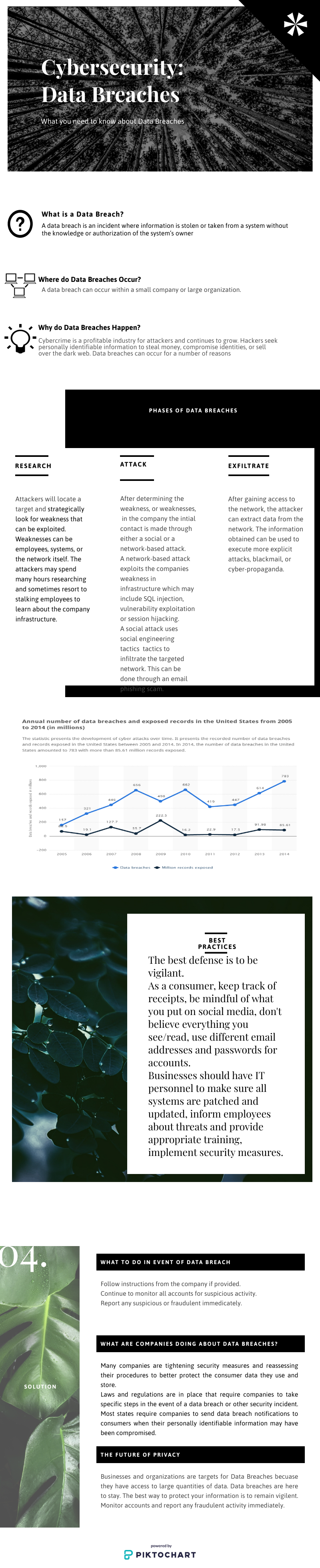
For this assignment we were to research cybersecurity. We were to choose a topic that interested us and create a Piktochart that could be used to educate the public on our topic. I chose to research Data Breaches. These seem to be happening very frequently and I often get emails from credit monitoring sites indicating one of my accounts may have been involved in a breach. I felt this topic is relevant to everyone because almost every company is vulnerable to a data breach.
Emily’s Story
This week we are learning about cybersecurity. We were to watch a video about a girl whose identity was stolen through Facebook. She described her childhood and the ordeals she went through regarding her medical condition. She made it through her medical concerns and went on to gain publicity for being able to play volleyball in high school with no depth perception due to losing an eye at a very young age. The media attention is what led to her identity being stolen.
After watching her video we were to answer these questions:
- What are your reactions to her story?
- What did you learn from her story?
- How might you use this story to inform your life or that of others?
I am amazed of Emily’s resilience. She has been fighting her entire life. Even when someone tried to take her identity she fought back and took control of the situation. The first thing I learned from her story is you have to be careful of your online presence. Not only what you post and who you add as a friend, but also checking to make sure there aren’t multiple accounts listed for your name. The second take away is that even if you aren’t posting things yourself there are other ways people can get enough information about you to steal your identity. Emily was on the news and had articles written about her. Her identity was compromised by her publicity, not her actual personal Facebook or other social media accounts. Its a good idea to do random searches to see if your “popping up” more than you should. You can do google searches and even a free credit check will show if something is off. I had my daughter watch this video with me. We talk about online security often because she likes to play games online. I made her aware that there are people who will lie to try to get information or harm her in other ways. She is not allowed to play games that allow online interactive chats and I monitor all her screen time. This video made her realize how vulnerable you can be online.
Singularity Powtoon
Our assignment was to create an animated video on the topic of our Mid-Term research paper. My topic was Singularity. I used research from Ray Kurzweil, James D. Miller, and Paul Allen, just to name a few. This topic was introduced to me at the beginning of the semester. During that assignment, I read parts from Kurzweil’s book, The Singularity is Near, and it was very intriguing. I purchased the Kindle book and was excited that I could do my research paper on this subject. There is a lot of information on Singularity and it seemed like I was always finding more to include.
We were to create this using an online animated vidoe making tool. There were two recommendations, Powtoons and Animaker. I tried Animaker first. The response time seemed very slow. Since I am not a patient person when dealing with technology, I deleted that and headed over to Powtoon. It was much faster and easier to work with. The tutorial was great and there were so many options. I used mostly a space theme because for me, technology and space go hand-in-hand. I think I might use this in the future. Making a video like this would be a great attention grabber and it would be customized to my lesson plan!
ThingLink
Part of this weeks assignment was to create a ThingLink presentation on a topic we chose. We are also to follow and incorporate the ARCS Model of Motivation. I chose the Declaration of Independence as my topic. I have included links to YouTube videos as well as an audio of God Bless the USA by Lee Greenwood. I do plan to use this as part of a social studies lesson in my classroom.
Inquiry-based Learning PowerPoint
For this weeks lesson, we were to research the Inquiry-based Learning method. This method is based on giving students a question and they are to find the best way to answer the question. As students progress they will develop their own questions. The second part of our lesson was how to create a PowerPoint presentation. We were given guidance on how to create effective presentations that are interesting and will not put our audience to sleep.
PowerPoint for EME 2040
I think PowerPoint has helped in education. I have seen it used very successfully in schools. I have also delivered classes using PowerPoint while in the Army. After watching the videos presented in this module, I may have used too many words on my slides and used my presentation as a script to read from. In my defense, I was young and very nervous about presenting a class to a room full of Senior Non-Commissioned Officers.
I think one of the most important things to remember is that PowerPoint should be used as a visual aid, not a format to show your entire speech. Another is that it must be engaging and relevant to your topic. The presentation shown should include something to connect the visual on the screen to the point you are trying to convey.
I learned from this that PowerPoint allows you to edit the pictures your putting into your slides and you can crop out the background. This information would have been helpful when my daughter had to create a presentation for her class that included pictures. I will experiment with this option further.
Artificial Intelligence in the Classroom
While researching AI for the classroom, I realized that it is used everyday. Each of my daughters teachers have used it in the classroom in some way. I will use it in the classroom much the same way they have. I love the functionality of MobyMax and MyOn for tracking the progress of students.
I have discovered that I would be considered part of the late majority for new technology. I spend so much time working that I don’t get to learn about new technology until it is presented to me as something I need to continue progressing. Once I am given the opportunity to learn and experiment with it, I like to share it with others.
After reading about the diffusion of innovation and researching the use of artificial intelligence in the classroom, I believe the education system is behind in instituting many new forms of technology. This needs to be corrected and all students should be given the chance to learn and use new technology.
 Jessica Strayer